Before the Group Chat: The Rural Noticeboard's Place in Local Life
A rural noticeboard keeps useful local information visible beyond group chats, with simple routines for choosing, updating and placing notices people can act on.
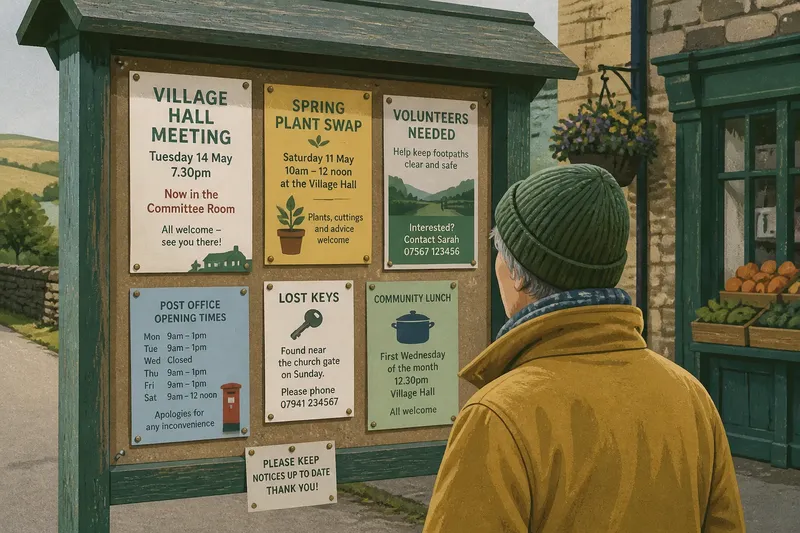
A rural noticeboard keeps useful local information visible to people who were never added to the group chat. Its value is practical: it connects a message with a place residents already visit, such as the village shop or parish hall. That makes the board a useful partner to digital channels, not a relic that has to compete with them.
Its usefulness depends less on the board itself than on a modest routine: check what is posted, make room for current information, and remove notices that have expired. A small rota can do the work without turning the noticeboard into a second newsroom.
A rural noticeboard puts messages where people already stop
In many villages, local information has travelled through a mixture of personal conversation, handbills and notices placed at familiar stopping points. A shared board is one practical way to gather some announcements where passersby can see them without needing to know the organiser first. The exact history differs from place to place; a board outside a church, near a village hall entrance or in a shop porch is an illustration of how communities may use a common location, not a universal account of how noticeboards began.
A notice can be checked again on the way home, which suits a meeting time, a lost-property note or a request for help. The board cannot ensure that everybody sees the message, but it offers a public route to information without requiring a personal introduction.
A short routine keeps notices current and readable
One person or a small rota can check the board during an existing visit to the shop, hall or community room. Each check should lead to a clear decision rather than a vague sense that the board could use tidying.
- Check dates. If an event date has passed, remove the notice; if it is still ahead, leave it up and confirm that its details remain legible.
- Check whether new notices can be seen. If fresh information is covered or crowded out, remove an expired sheet or rearrange the current notices; if everything is readable, leave the layout alone.
- Check for a contact route. If the notice has a public phone number, email, named organisation or place to ask, leave it; if it has none, ask the organiser to add one or remove the notice if no follow-up is possible.
- Check time-sensitive changes. If a road, room or service notice has been superseded, replace it or mark it clearly as outdated; if its status is unclear, contact the named organiser before changing it.
- Check recurring notices. If the activity and contact details are still confirmed, keep the notice and add a review date; if nobody can confirm them, remove it until the organiser supplies current details.
- Check permission and personal details. If the owner has approved the posting and any named person has agreed to public contact details, leave it; if permission is missing, ask before posting or take the notice down.
Imagine a residents’ group has posted that a hall meeting moved rooms, while the shop board still gives the old location. A volunteer sees both notices during a routine check, confirms the new room with the organiser, removes the stale sheet and posts the updated details with a contact route. A passerby who does not use the chat can then find the current location and ask if anything remains unclear.
A board and a group chat serve different needs
A group chat can carry a quick correction, invite replies and help neighbours coordinate while plans change. Its reach depends on membership, phone access and whether someone notices a message in the flow of conversation. It is well suited to discussion, but a useful detail can soon sit beneath newer messages.
A noticeboard is slower and limited to its physical location, but a notice can remain visible for people who pass later. It suits regular activities, public meetings, community meals, volunteer requests and changes to opening arrangements. It is a poor place for urgent coordination, private details or a conversation that needs an immediate answer.
Think about who needs the information and where they are likely to encounter it. If a message matters to people beyond an online group, publish the confirmed details in a public place as well. Keep personal or sensitive information out of public notices.
Placement, readability and permission determine who can use the board
A board beside a shop entrance may reach people making routine errands; one inside a hall may mostly reach people attending events. Choose a location where readers can stop without blocking a doorway, and consider whether they can read the notices while sheltered from the weather.
Use a covered board where exposure is a concern, and give notices clear headings so readers can distinguish an event from a service change or request. Direct lettering is easier to scan than decorative design when someone has only a moment to spare.
Agree who may post, how long notices stay up and whom to contact for corrections or removal. A board may reserve room for community activities and public services while setting a separate policy for commercial material. Ask the shop, church, hall or council responsible for the site before posting, and get permission before making a person’s name, photograph or contact information public.
Which notices belong on a rural noticeboard?
What information suits a rural noticeboard?
Public events, regular activities, community requests and changes to local arrangements usually fit. State what is happening, where and when, and include a way to ask for details without assuming readers already know the organiser.
How long should a notice stay up?
Keep it until the event or request has passed, then remove it during the next routine check. For recurring activities, include a review date or a contact who can confirm that the details remain current.
Should a noticeboard repeat information from a group chat?
Yes, if the message matters to people who may not use the chat or should remain visible beyond the conversation. Copy confirmed details, not private discussion or names shared only within the group.
Who should maintain a community noticeboard?
The owner can appoint a volunteer, a small rota or an organisation already responsible for the site. Make clear who can approve posts, remove expired material and respond to requests for corrections.
A rural noticeboard can offer a public route into local life
A board can make a message visible without asking its reader to belong to a network first, but it is not accessible to everyone by default. People need to pass the location, read the notice and have a way to follow up. A clear contact route helps turn a passing glance into an opportunity to take part.
Keep the routine small enough to last: check the board during an existing visit, leave space for current information and remove notices when their purpose has passed. Let the group chat handle quick conversation and the rural noticeboard hold information that deserves a public, lasting place.